Error Study tab
The Error Study tab is where you configure tolerance / Monte-Carlo error studies and launch the ensemble. Sits between Surrogates and Failure Study in the tab strip.
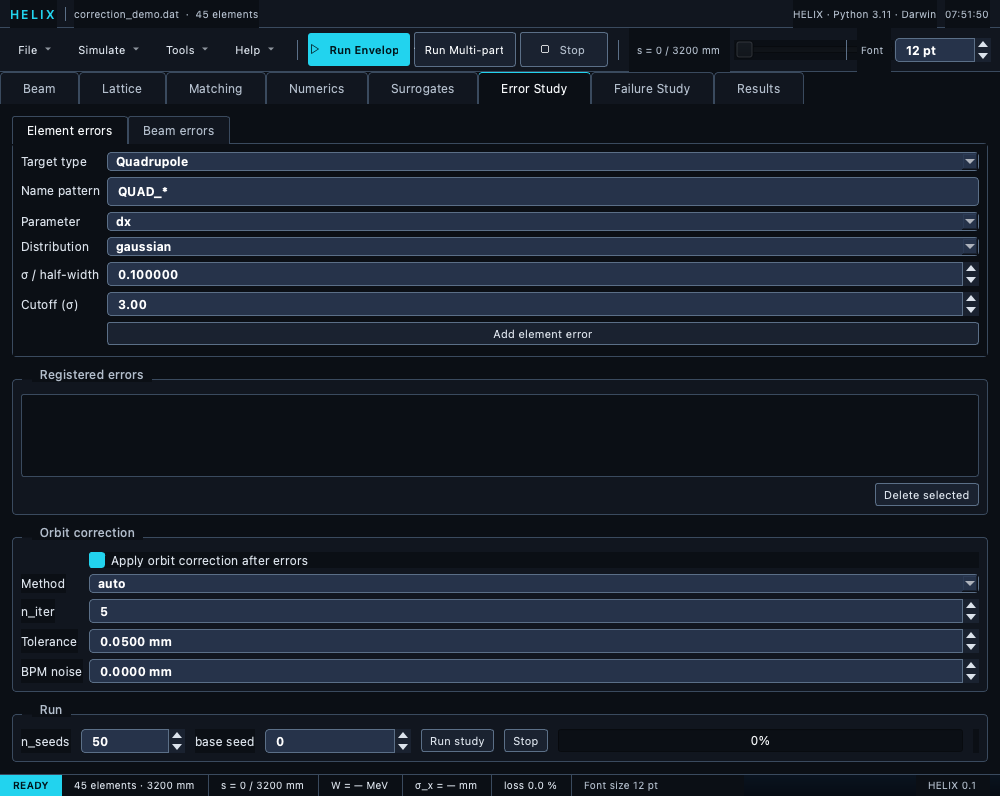
Error Study tab — element/beam error forms, registered-errors list, orbit-correction group, and the run controls.
Layout
┌──────────────────────────────────────────┐
│ [ Element errors ] [ Beam errors ]        │ ← Sub-tabs
├──────────────────────────────────────────┤
│ Add error form:                          │
│   Target type: [Quadrupole]              │
│   Name pattern: QUAD_*                   │
│   Parameter: [dx]                        │
│   Distribution: [gaussian]               │
│   σ / half-width: 0.2                    │
│   Cutoff (σ): 3.0                        │
│   [Add element error]                    │
├──────────────────────────────────────────┤
│ Registered errors:                        │
│   [ELEM] pattern=QUAD_* param=dx ...      │
│   [ELEM] pattern=QUAD_* param=dy ...      │
│   ...                                    │
│   [Delete selected]                      │
├──────────────────────────────────────────┤
│ Orbit correction:                        │
│   ☐ Apply orbit correction after errors  │
│   Method [auto]  n_iter [5]              │
│   Tolerance [0.05 mm]  BPM noise [0 mm]  │
├──────────────────────────────────────────┤
│ Run: n_seeds [50] base seed [0]          │
│      [Run study] [Stop] ▓▓▓▓▓            │
│ Status: seed 27/50 done                  │
└──────────────────────────────────────────┘
Sub-tabs
- Element errors — alignment + field errors per element.
- Beam errors — input-beam jitter (centroid, ε, mismatch, current).
Add an element error
- Pick Target type — Quadrupole / Cavity (RFGap) / Bend (Dipole) / Solenoid.
- Name pattern auto-fills (
QUAD_*,GAP_*, ...). Edit for specific elements. - Pick Parameter — fields refresh per target type.
- Pick Distribution — gaussian or uniform.
- Set σ / half-width in appropriate units (mm, deg, fractional).
- Set Cutoff (gaussian only).
- Click Add element error.
Add a beam error
- Switch to the Beam errors sub-tab.
- Pick Parameter — centroid_x, current_rel, etc.
- Set distribution + σ + cutoff.
- Click Add beam error.
Orbit correction
Tick Apply orbit correction after errors to run a correction pass per seed between error injection and tracking, so the recorded centroid is the corrected orbit. The group's controls (enabled only when the box is ticked):
- Method —
auto(one-to-one when #steerers == #BPMs, else SVD),one_to_one, orsvd. - n_iter — correction iterations per seed (default 5).
- Tolerance — target RMS orbit in mm (default 0.05).
- BPM noise — 1σ measurement noise added to the BPM readings (mm; default 0).
- Steer onto DIAG_POSITION targets — correct each sample onto the
deck's recorded
DIAG_POSITIONtargets (or a loaded BPM-targets file) instead of flattening to zero — TraceWin's "matched with diagnostics" per error sample. Target-less BPMs still steer to zero. - Readings —
mp(legacy: track a particle beam per reading) orenvelope (fast): deterministic envelope-centroid readings, no sampling noise, ~an order of magnitude faster per seed.
See Errors → Orbit correction.
Run study
- Set n_seeds (default 50; 100-200 for production). The base seed spinbox offsets every per-seed RNG draw — leave at 0 for the canonical run, or bump it (e.g. 1000) to extend an existing 50-seed study with statistically independent seeds [1000–1049].
- Click Run study. The status line confirms whether the study
runs with space charge ON or off — it uses the exact
SpaceChargeConfigfrom the Numerics tab whenever the beam current is non-zero, the same configuration a toolbar multi-particle run would use. - The progress bar advances per completed seed
(
seed k/n doneon the status line). - On done: results land on
state.error_study_results→ open the Results tab to view ensemble plots.
Stopping a study
Stop ends the study after the seed currently being tracked
(latency: one lattice element). Seeds that completed are kept as a
partial ensemble — only whole seeds are aggregated, so the
statistics stay valid — and stored for the Results tab; the status
line reports stopped — k/n seeds kept. If no seed finished,
nothing is stored.
ERROR_* directives from the .dat
If your .dat has ERROR_* directives, Run study honours them
automatically — no form entry needed. They do not appear in the
"Registered errors" list, which shows only form-added specs; the
directives live on the parsed lattice itself and are merged in at
run time. If the list and the lattice are both empty, Run refuses
with a "no errors" warning.