Numerics tab
Configure tracking-step density and space-charge solver settings.
Wraps SpaceChargeConfig and tracker-level integrator parameters
in a single panel.
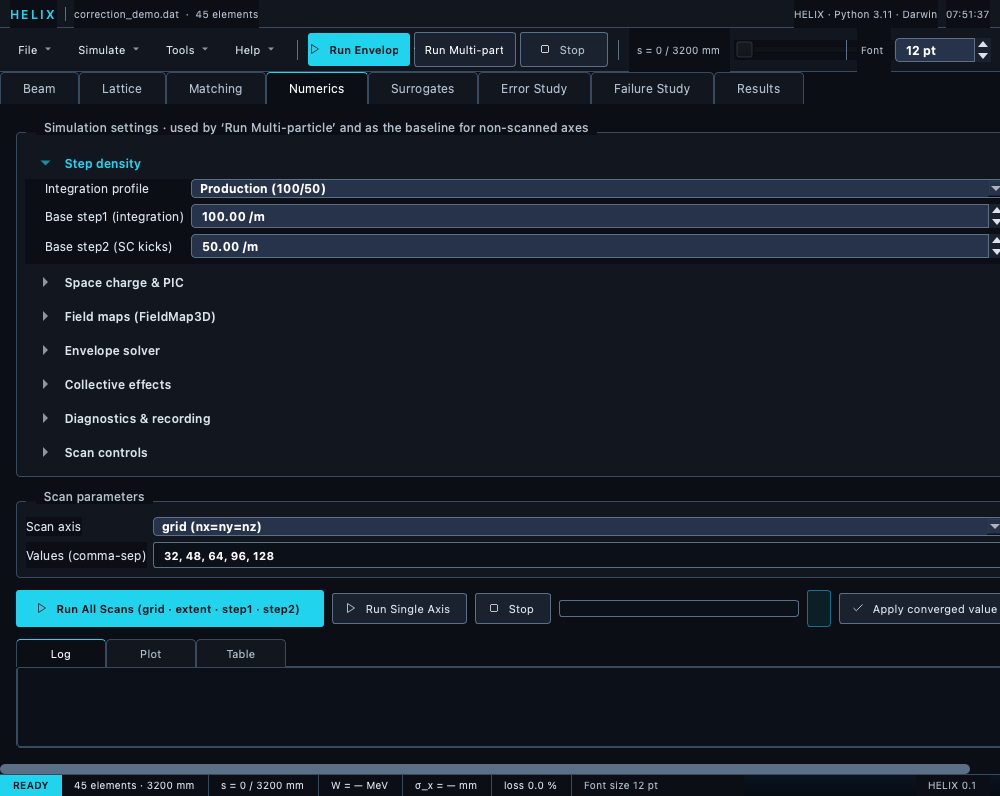
Numerics tab — collapsible numerics sections plus the built-in convergence-scan controls.
Sections
The settings panel is grouped into seven collapsible sections; only "Step density" opens by default, and each section's open/closed state is persisted per user across sessions:
- Step density — an Integration profile preset combo
(
Production (100/50)/Matching (30/15)/Custom— editing either spinbox by hand switches to Custom), plus base step1 (integration steps per metre) and step2 (SC kicks per metre). Map to TraceWin'sPARTRAN_STEP step1 step2. Below them, Single-push field-free drifts (on by default): a drift is pushed once when nothing sits between its sub-steps, and a loss inside it is located exactly on the particle's straight line; untick it to keep the sub-stepped walk of HELIX ≤ 1.9.1. With it on, a step1 scan at zero current only probes field maps. - Space charge & PIC — Base PIC grid (nx=ny=nz): a single
cubic spinbox (one value sets all three axes); grid extent
(σ multiplier); PIC backend (auto / cpu / gpu / cuda / mps);
SC engine —
numpy(production PIC, default) ortorch(the differentiable PyTorch PIC). Picktorchfor the autograd-differentiable space-charge kick; it runs FP64 on CPU, handles bunched beams only, and is markedly slower. Selecting it greys out Grid mode, PIC backend and DC kernel (torch ignores them — it always uses an adaptive grid); a continuous beam falls back tonumpyautomatically. Also: Green's function (IGF / point), particle-mesh kernel (CIC / TSC), grid mode (fixed / adaptive), and the DC SC kernel (uniform / gaussian / pic2d) for continuous beams. - Field maps (FieldMap3D) — integrator (KD / DKD) and interpolation order (linear / cubic).
- Envelope solver — solver choice:
matrix(element-by-element transfer-matrix Σ propagation, default) orsacherer(coupled KV envelope ODE integrated with RK45; better under strong SC where the matrix split-operator under-resolves). - Collective effects — "CSR in bends" checkbox: apply a 1-D steady-state Coherent Synchrotron Radiation energy kick inside dipoles (multi-particle runs only — see Space-charge models → CSR).
- Diagnostics & recording —
record_substepscheckbox; Record particle density (histogram all alive particles into a 2-D density grid along s); Snapshot every N (full 6-D particle dump every N elements; 0 = onlyMarker(snapshot=True)fires); density bins and density extent (±mm) for the density recording. - Scan controls — Scan N particles (macroparticle count the convergence scans use) and Parallel workers (0 = serial; N > 1 fans scan points across processes).
Convergence scans
Convergence scans are built into this tab — no separate dialog. The Scan parameters group has:
- Scan axis combo —
grid (nx=ny=nz),grid_extent (σ),step1 (integration/m),step2 (SC kicks/m), orn_particles. - Values (comma-sep) field — the scan points; defaults to
32, 48, 64, 96, 128.
The run row below offers:
- Run All Scans (grid · extent · step1 · step2) — scans all four PIC/step parameters in sequence and auto-applies the converged value for each axis as it finishes.
- Run Single Axis — scan just the selected axis with the Values list.
- Stop — halt at the next element boundary, keeping the rows already completed.
- Apply converged value — write the converged row's scan value back into the base settings used by Run Multi-particle.
Results stream into a tabbed output pane: Log (per-axis convergence log), Plot (ε_x end + σ_y vs scan value), and Table (per-point σ_x / σ_y / σ_φ / ε_x / ε_y / wall time).
Tooltips with formula references
Each field has a tooltip explaining its meaning + the relevant physics paper. E.g. the IGF tooltip cites Qiang et al. 2006.
Project dirty tracking
Every "fixed" setting in this tab (PIC grid, SC engine, Green's
function, particle-mesh kernel, integrator, interp, step1 / step2,
single-push drifts, CSR flag) is serialised into the .lgproj JSON. Changing any of
them marks the project as dirty so closing without Save Project
triggers a warning. Section-collapse toggles and scan-axis widgets
don't flag the project — collapse states persist per user via
QSettings instead, and the scan-axis widgets are session-only. See
Lattice tab → Unsaved-changes prompts.