Beam tab
Configure the input beam: species, energy, current, distribution,
Twiss, centroid offsets, mismatch, halo. Maps 1-to-1 to
BeamConfig fields.
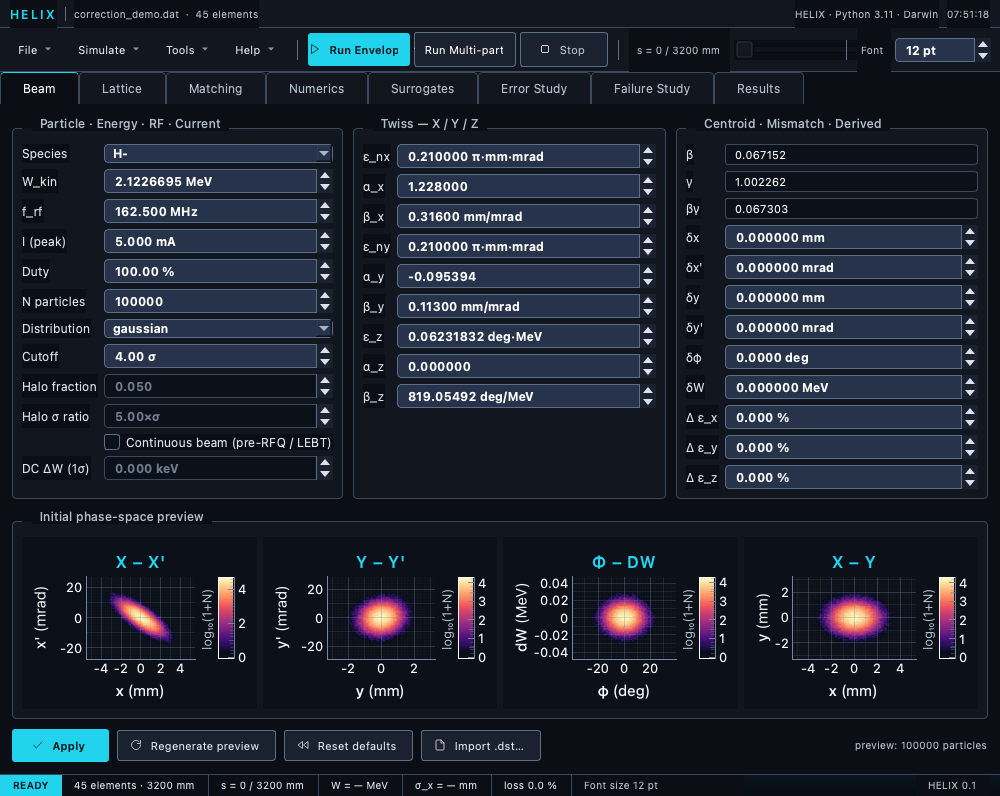
Beam tab — particle/energy/current group, per-plane Twiss, centroid & mismatch, and the four-panel phase-space preview.
Layout
The tab is three fixed group boxes side by side, a four-panel phase-space preview underneath, and a button row at the bottom — nothing collapses:
- Particle · Energy · RF · Current — species dropdown, W_kin
(MeV), f_rf (MHz), peak current (mA), duty cycle (%), N particles,
distribution dropdown, cutoff (σ), the halo controls, and the DC /
continuous-beam controls (
Continuous beamcheckbox, DC ΔW energy spread, andPeriodic phase (bunch train)). - Twiss — X / Y / Z — ε_nx, α_x, β_x, ε_ny, α_y, β_y, ε_z, α_z, β_z.
- Centroid · Mismatch · Derived — read-only derived β / γ / βγ for the current species + energy, deterministic centroid offsets (δx, δx', δy, δy', δφ, δW), and fractional emittance mismatch (Δ ε_x / Δ ε_y / Δ ε_z, %).
The halo fraction and halo σ ratio fields are always visible
but enabled only when the distribution is thermal (bi-Gaussian);
they grey out for every other distribution.
Initial phase-space preview
The Initial phase-space preview group shows four log-intensity 2-D density panels of a sample beam: x–x', y–y', φ–dW, and the real-space x–y view (which surfaces transverse coupling / mismatch at a glance). Regenerate preview redraws it from the current form values.
Button row
- Apply — build a
BeamConfigfrom the form and commit it to the app state (see below). - Regenerate preview — refresh the four preview panels.
- Reset defaults — restore every field to its default value.
- Import .dst… — see next section.
- Import TraceWin .ini… — the beam of a TraceWin project options file; see below.
Importing a .dst distribution
The Import .dst… button reads a TraceWin .dst particle file
(there is no format selector — .dst is the import format). The
file's header auto-populates the form: energy, frequency, current,
particle count, and the calculated ε / Twiss per plane. The
simulation then reads the actual particles from the file
(source="file") instead of regenerating from Twiss. A file chip
appears next to the button naming the active .dst, with a
clear link that reverts to generate-from-Twiss mode.
Importing a TraceWin .ini project beam
The Import TraceWin .ini… button reads <project>.ini, the binary
options file TraceWin saves next to a project's .dat with what was
typed into its Main/Beam panels. Input beam 1 replaces the form:
species (from the file's particle-table row), energy, frequency,
current, particle count, the normalised emittances and the Twiss
parameters, converted to HELIX units — alpha_z is negated once, the
usual TraceWin convention (Appendix E).
Fields the file does not describe (distribution type, cut-off, DC
energy spread, centroids) keep their current values; a DC project
(eps_z = 0) switches the form to continuous; a particle the file
defines that HELIX has no species for falls back to the combo's
selection, with a warning in the console; a value outside a field's
range (say 5 000 000 particles) is clamped by the form and reported. The
imported beam is applied
to the app state at once (it becomes the session beam) and the project
is marked dirty; the source stays generate. The same import is
offered automatically when Open Lattice… finds a <deck>.ini next
to the deck, and the New Project wizard has a checkbox for it — see
Importing TraceWin project settings
for what is decoded, and what is not.
DC vs bunched mode
For pre-RFQ LEBTs:
- Set continuous = True.
- Set emit_z = 0 (no longitudinal structure).
- Optional: set DC energy spread (keV).
- Optional, for a run through an RFQ or buncher: tick Periodic phase (bunch train).
Forgetting continuous=True produces non-physical σ_φ blow-up;
see DC mode.
Periodic phase (bunch train)
Enabled only while Continuous beam is ticked — the fold applies to a beam that was injected DC and has since been bunched, which is the only kind that represents one period of a bunch train. Unticking DC greys the box out but keeps your setting, and the greyed-out value is never written into the project.
An RFQ makes one bunch per RF period, but the simulation seeds a single period. Space charge then pushes ~20 % of the particles across a bucket boundary and, with Δφ stored unwrapped, they sit a full bunch spacing away as satellite stripes — inflating every reported σ_φ and ε_z (183° for a bunch that is really 4°). With this ticked the tracker folds Δφ into one bunch spacing during tracking, so the satellites never form and the reported longitudinal numbers are single-bunch values.
With space charge off nothing else moves at all: same losses, same transmission, same transverse coordinates to 1e-12. With space charge on the solver sees a compact bunch instead of a multi-bucket clump, so the run genuinely differs — on the PXIE 66 kV deck at 5 mA, line transmission moved 62.0 → 60.6 % and ε_nx 0.142 → 0.194 π·mm·mrad. That is the intended effect, not a side effect; see RFQ cell → bunch train for the numbers and their comparison with the PIP2IT measurement.
Three consequences worth knowing:
- Backtracking refuses a run made with this on — the fold is not invertible.
- It cannot be combined with CSR (
csr_enabled), which is rejected with an error: the CSR wake is built from the ensemble's absolute longitudinal extent and is not periodic in the bunch spacing. - ε_z is no longer exactly constant through a drift. Each bucket crossing is a step change in the reported longitudinal emittance, so ε_z(s) develops a staircase wherever particles are still crossing. Measured over 40 identical drifts: a badly debunched test beam went from 1.4 % spread to 64 %, while a beam that stays inside its bucket measured exactly 0.000 % both ways. This is inherent to the Toutatis convention — the particle really did move to the neighbouring bunch — and it is why a matching objective built on σ_φ or ε_z should be re-tuned rather than reused across the switch.
Tooltips
Hover any field to see its meaning, units, and typical value range. The full reference lives at BeamConfig field reference.
Apply and the project dirty flag
Beam config lives in the .lgproj JSON file, not the lattice .dat.
Clicking Apply marks the project as dirty so the close prompt
warns you if you've changed beam parameters but not yet saved the
project. Internal beam updates (project load, matched-beam apply
from the Matching tab) are explicitly marked clean — only your direct
clicks of Apply flag the project as dirty. See Lattice tab →
Unsaved-changes prompts.